
UX Case Study · Lowe’s Pro Extended Aisle
PEA Item-Level Services & Fulfillment Configuration
Helping store associates confidently configure complex vendor delivery options for Pro customers — reducing cognitive load and improving service visibility between cart building and checkout.
Overview
As part of Lowe’s Pro Extended Aisle (PEA) initiative, I led UX design for a new fulfillment configuration experience focused on item-level delivery services. The project aimed to help store associates confidently configure complex vendor delivery options for Pro customers while reducing cognitive load and improving service visibility.
This work was critical to onboarding Foundation Building Materials (FBM) onto Lowe’s selling platforms following Lowe’s $8.8B acquisition of FBM — enabling the business to begin realizing return on that investment through Pro selling and jobsite fulfillment.
The experience sits within the broader Fulfillment journey — specifically the point between cart building and checkout where associates configure delivery details for customer orders.
Problem
Vendor delivery services such as Boom Delivery, Scatter Delivery, Charge for Stairs, and future item-level service fees were difficult for associates to understand and configure correctly. The existing experience had several major usability issues:
- Important service information was hidden behind low-visibility links
- Associates struggled to understand pricing tiers and delivery requirements
- The workflow required significant product and fulfillment knowledge
- Service configuration lacked scalability for future vendor fulfillment models
- Associates often missed critical information during cart building
- Existing flows created low confidence in decision-making
This became especially problematic for large Pro orders involving jobsite delivery, specialty truck types, or additional labor services.
My Role
I owned the end-to-end UX process for the feature including:
- UX strategy
- Information architecture
- Interaction design
- Responsive behavior exploration
- AI-assisted workflow concepts
- Prototyping in Figma
- Cross-functional alignment with Product and Engineering
- Usability testing planning
- Presentation and stakeholder reviews
I collaborated closely with product managers, engineering, fulfillment stakeholders, service and operations teams, and other UX designers.
Goals
The project had two primary goals:
- Simplify fulfillment service configuration for store associates
- Improve visibility and comprehension of vendor delivery services and pricing
Secondary goals included:
- Creating a scalable framework for future item-level services
- Supporting multiple fulfillment models across vendors and markets
- Reducing training dependency
- Increasing confidence during customer conversations
- Designing patterns that could scale to future mobile experiences
Research & Discovery
Through stakeholder conversations, workflow reviews, and usability planning, several themes emerged:
Associates needed guidance
Many associates did not understand:
- Which delivery option to choose
- When specialized delivery services applied
- How pricing tiers worked
- What information customers needed before purchase
Critical information was being missed
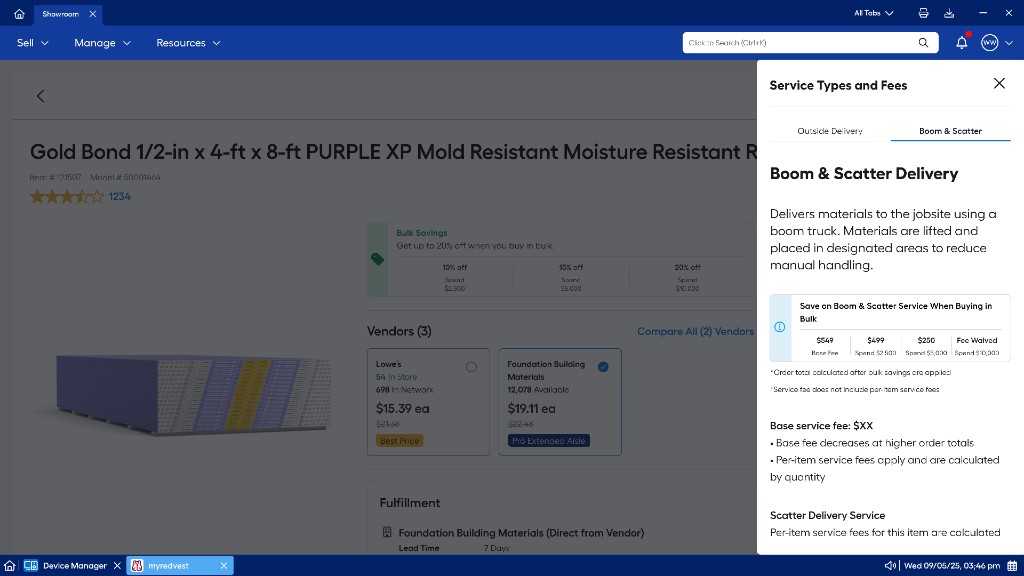
One of the largest UX issues was “banner blindness.” Important educational content existed behind a small “learn more” link that users consistently ignored during testing and walkthroughs.
Configuration complexity varied by market
The framework needed to support highly variable vendor fulfillment rules while remaining simple enough for store associates to use quickly during sales interactions.
Defining the UX Strategy
How might we expose complex fulfillment and pricing information at the right moment without overwhelming the associate?
To solve this, I focused on three design principles:
- 1. Progressive disclosure Only show the information associates need at a given step.
- 2. Decision support Help associates make confident recommendations instead of memorizing fulfillment logic.
- 3. Scalability Create patterns flexible enough for future fulfillment services and vendor models.
Key Design Decisions
1. Reframing the drawer experience
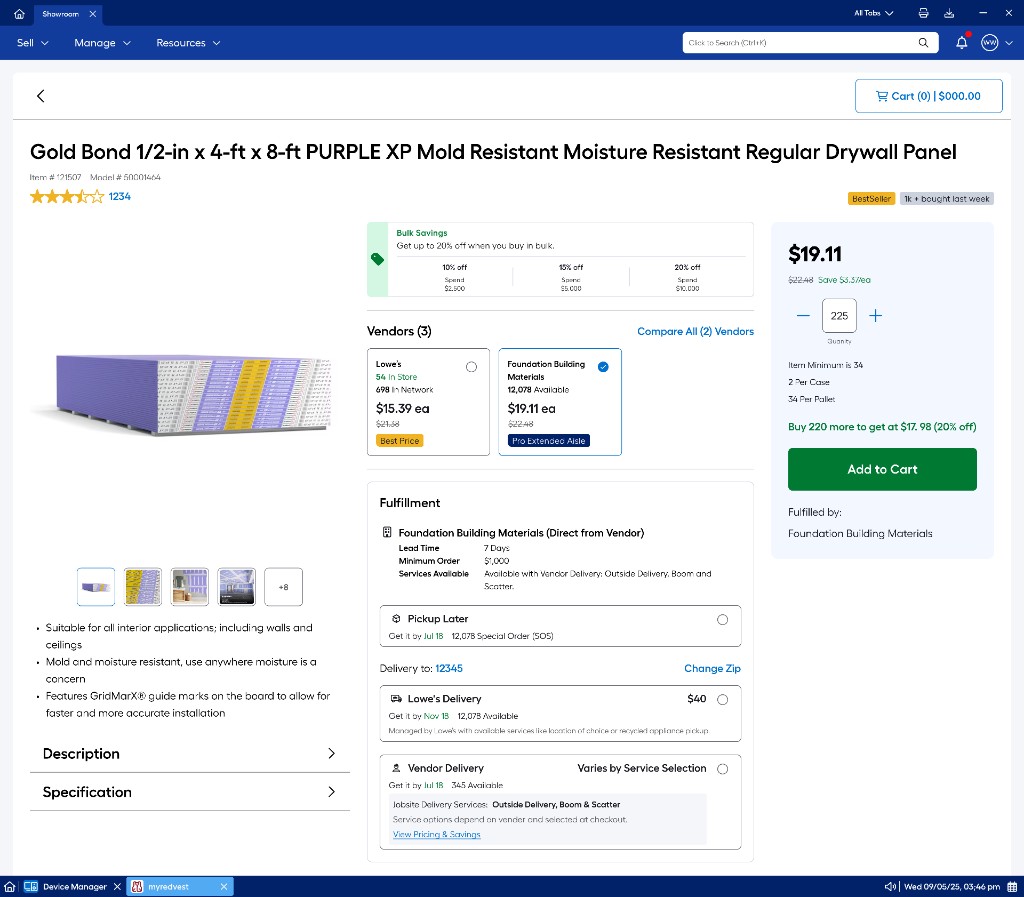
The existing design relied heavily on hidden informational content. I redesigned the experience around a dedicated service details drawer that surfaces pricing tiers, service descriptions, and bulk-savings context when associates need it — without cluttering the primary product flow.
2. Item-level fulfillment at checkout
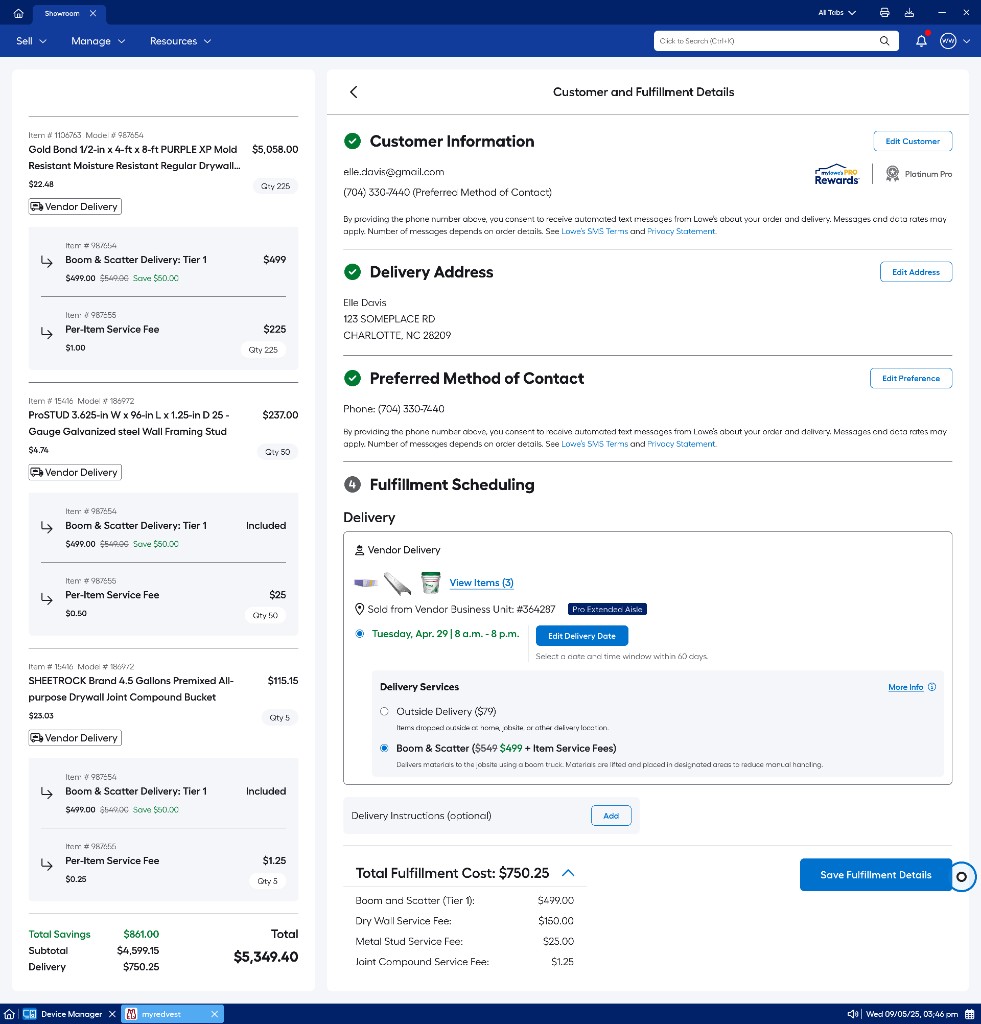
At checkout, associates configure delivery services per order with clear cost breakdowns. The fulfillment scheduling step exposes delivery options, tiered fees, and item-level service charges in one place — supporting confident customer conversations on large Pro orders.
3. Scalable patterns across the journey
Together, the PDP and checkout patterns create a consistent framework: progressive disclosure on the product page, decision support in the service drawer, and transparent pricing at fulfillment configuration — designed to scale as new vendor services and markets are added.
Pre-production screens shown for portfolio purposes. © Lowe’s Companies Inc. All rights reserved.