
UX Case Study · Fulfillment Scheduling
Smart Group Comparison Tool
Reimagining delivery scheduling through AI-assisted order optimization
An AI-assisted fulfillment scheduling experience that automatically organizes delivery groups and helps associates compare optimized delivery strategies side-by-side — turning manual scheduling into intelligent decision support.
Overview
Large contractor and Pro orders often contain dozens of products with varying delivery constraints, fulfillment methods, truck requirements, and availability windows. Associates were expected to manually coordinate these variables while balancing customer expectations around speed, cost, and convenience.
The existing fulfillment experience created cognitive overload and made advanced delivery options like staggered delivery difficult to discover, understand, and confidently recommend.
To solve this, we designed the Smart Group Comparison Tool — an AI-assisted fulfillment scheduling experience that automatically organizes delivery groups and helps associates compare optimized delivery strategies side-by-side. This concept explored how AI-generated delivery optimization and an AI Companion chat assistant could transform fulfillment from a manual scheduling task into an intelligent decision-support system.
Problem
Associates struggled to answer questions like:
- What’s the fastest way to deliver this order?
- Can we reduce the number of deliveries?
- How do we minimize delivery cost?
- Which items should ship together?
- What happens if some products are delayed?
The current workflow required associates to manually:
- Review item-level fulfillment constraints
- Identify compatible delivery groupings
- Compare tradeoffs between speed and cost
- Explain complex delivery scenarios to customers
Key pain points
- High cognitive load during fulfillment scheduling
- Low discoverability of staggered delivery functionality
- Difficulty comparing multiple fulfillment strategies
- Increased training dependency for newer associates
- Slow checkout experiences for large Pro orders
- Inconsistent delivery recommendations across stores
Opportunity
We identified an opportunity to use AI as a collaborative decision-making layer inside fulfillment scheduling. Instead of asking associates to manually create delivery groups, the system could:
- Automatically generate optimized delivery configurations
- Explain tradeoffs between delivery options
- Recommend solutions aligned to customer priorities
- Reduce fulfillment complexity into understandable choices
This shifted the experience from “build delivery groups manually” to “review and apply intelligent delivery recommendations.”
Solution
The Smart Group Comparison Tool introduced three core concepts:
1. AI-generated delivery groupings
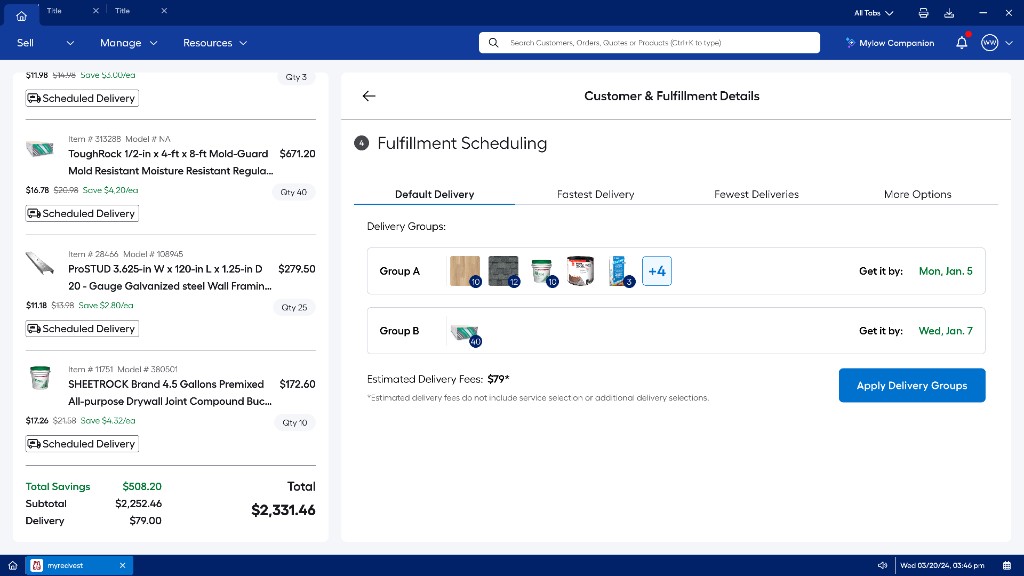
The system automatically analyzed the order and generated optimized delivery scenarios based on fulfillment goals — including Default Delivery (balanced speed and cost), Fastest Delivery, Fewest Deliveries, and More Options.
Each recommendation intelligently grouped products using inventory availability, truck compatibility, product type, delivery geography, service tier requirements, and fulfillment timing constraints — transforming staggered delivery into a guided experience instead of a hidden advanced feature.
2. Side-by-side comparison experience
The interface allowed associates to compare delivery strategies through a tabbed scheduling model. Each scenario clearly communicated delivery group composition, estimated arrival dates, delivery count, and estimated fees — reducing mental effort by letting associates evaluate tradeoffs visually rather than mentally simulating outcomes.
3. Contextual AI assistance
Rather than opening a full assistant immediately, the experience waits until the associate has explored delivery options — clicking through tabs and spending time on the comparison view. A lightweight prompt then asks if they would like help comparing Smart Group options.
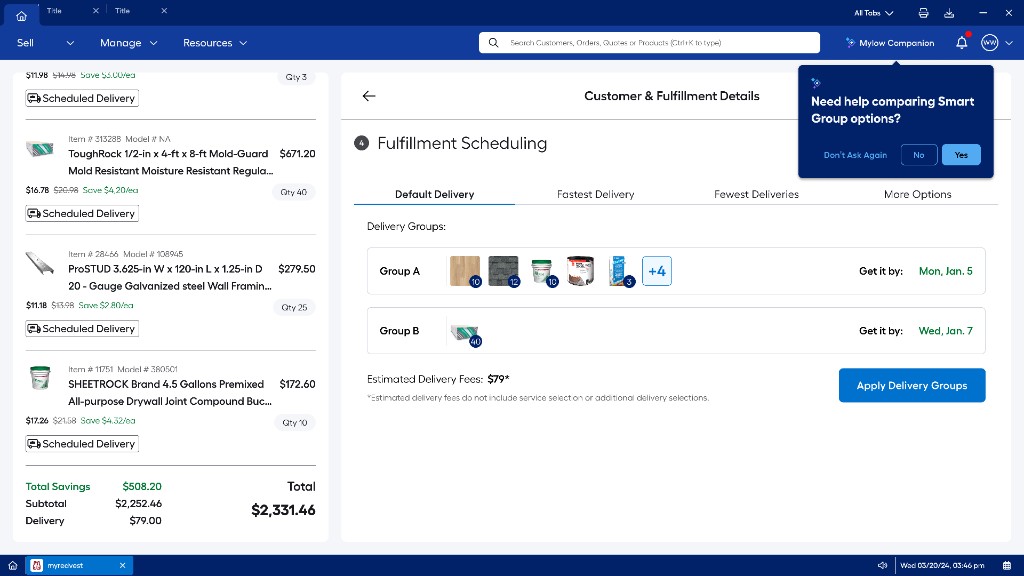
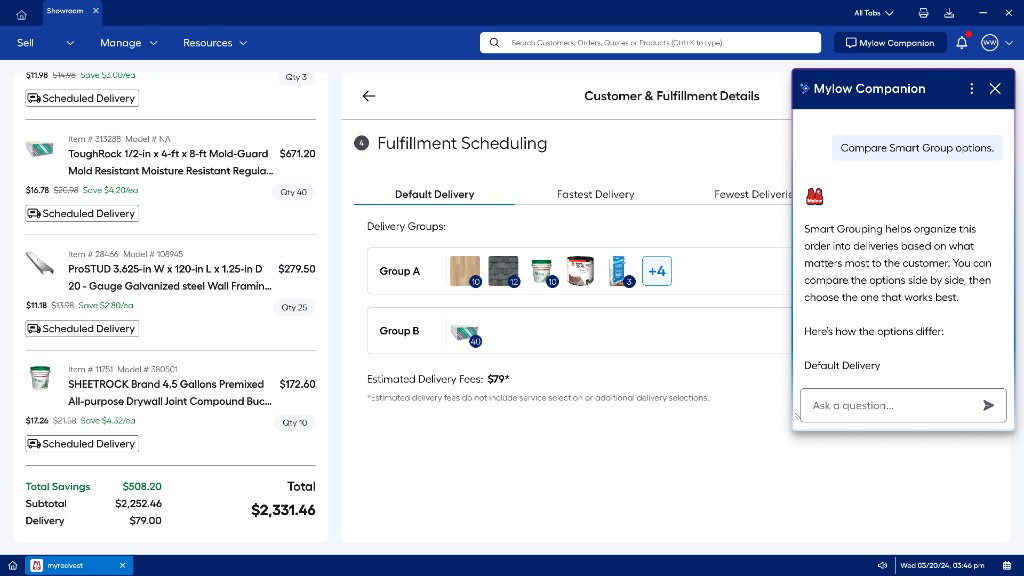
If the associate accepts, the Mylow Companion opens as an explainability and coaching layer. It can explain why items were grouped, clarify differences between strategies, recommend options based on customer goals, and educate associates on fulfillment logic in real time.
Example prompts included:
- “Compare Smart Group options.”
- “Which option minimizes cost?”
- “Can we get drywall earlier?”
- “Why are these items split into separate deliveries?”
Rather than replacing associates, the AI Companion augmented decision-making and reduced training dependency for complex fulfillment scenarios.
Design principles
- Progressive disclosure Advanced fulfillment complexity hidden behind simplified recommendations.
- Explainable AI Recommendations feel understandable and trustworthy — not algorithmically opaque.
- Associate confidence Clarity and transparency help associates guide customers with confidence.
- Speed to checkout Pre-built scenarios reduce time spent manually configuring fulfillment.
- Human-in-the-loop Associates review, compare, and apply groupings before finalizing.
UX decisions
Delivery group visualization
Products were grouped visually into delivery batches using compact item previews and quantity indicators — helping associates quickly see which items shipped together, how many deliveries were required, and which products drove separation.
Tabbed comparison architecture
Tabs simplified comparison between optimization strategies without overwhelming users — aligning with familiar mental models like “fastest,” “cheapest,” and “fewest stops.”
AI intervention pattern
The intervention → companion flow keeps associates in control: browse and compare first, get offered help when the system detects engagement, then open chat only if they want deeper explainability.
Emerging technology exploration
This project intentionally explored how AI could integrate into enterprise retail workflows. A conceptual optimization engine evaluated inventory systems, delivery logistics, fulfillment constraints, route efficiency, truck utilization, and customer priorities to dynamically generate recommendations.
The AI Companion explored how conversational interfaces could reduce onboarding time, increase feature discoverability, and make complex fulfillment logic easier to understand — positioning AI as a collaborative operational assistant, not automation replacing associates.
Impact
While conceptual, the solution aimed to improve:
Associate efficiency
- Reduced manual fulfillment configuration
- Faster scheduling decisions
- Lower cognitive burden
Customer experience
- More transparent delivery options
- Better expectation setting
- Faster checkout conversations
Business outcomes
- Increased utilization of staggered delivery
- Improved operational optimization
- Reduced failed delivery configurations
- Better truck and route efficiency
Reflection
This project represented a shift from designing static fulfillment workflows to designing intelligent systems that assist operational decision-making. The most valuable insight was recognizing that fulfillment complexity should not be exposed directly to associates or customers — AI could act as a translation layer between operational logistics and human decision-making.
The Smart Group Comparison Tool demonstrated how AI-assisted enterprise experiences can simplify complexity, improve confidence, and create more adaptive workflows without removing human control — reinforcing the importance of designing AI that is transparent, contextual, explainable, and collaborative.
My role
Lead Product Designer. Responsibilities included:
- End-to-end UX strategy
- Fulfillment workflow redesign
- AI interaction concepts
- Information architecture
- Comparative scheduling models
- Stakeholder collaboration
- Systems thinking across logistics and retail operations
- High-fidelity prototyping and storytelling
Pre-production screens shown for portfolio purposes. © Lowe’s Companies Inc. All rights reserved.